- Языки
- Русский
- Английский
- Другой
- Требуемый плагин
-
BedwarsPro
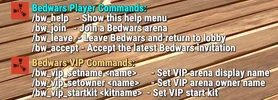
BedwarsPro is a comprehensive BedWars mini-game system developed for Rust servers. It combines classic BedWars mechanics with Rust gameplay, offering team battles, bed protection, respawn systems, build phase, fighting phase, VIP arena system, vending profiles, resource generators, supply drops, quarry integration, team clothing, and detailed arena management — all in a single plugin.
If you want to create an event-based, competitive, and highly replayable game mode on your server, BedwarsPro provides a powerful ready-to-use infrastructure.
Key Features
Arena-based:
start kit
respawn kit
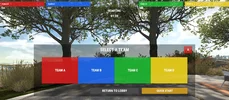
team select kit
In BedwarsPro, players are divided into teams, defend their base, and try to destroy enemy beds. If a player’s team still has their bed, they can respawn after death with a delay. However, if the team’s bed is destroyed, the player will be permanently eliminated after death. The plugin also includes a spectator system for eliminated players.
Match phases:
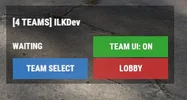
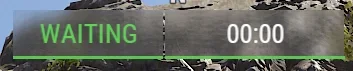
WAITING – players wait
STARTING – countdown begins
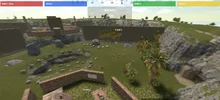
BUILDING – players prepare and build
FIGHTING – full combat begins
FINISHED – arena ends
Dependencies
The plugin references the following:
Kits plugin
CustomVendingSetup plugin
If you want to use kit systems, the Kits plugin is required. Otherwise, start kit, respawn kit, and VIP kit features will not function. The plugin also includes warning messages for missing dependencies.
Advanced Systems
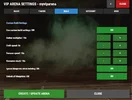
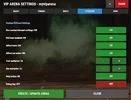
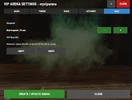
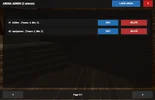
1) VIP Arena System
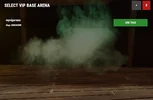
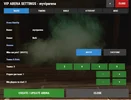
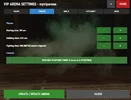
VIP players can create private arenas, invite players, and customize arena name and owner. Invite cooldown and max invites can be configured.
2) Team Clothing System
Each team has unique hoodie and pants skins (Red, Blue, Green, Yellow, Purple, Orange, Pink, Cyan), making teams easily distinguishable.
3) Resource Spot System
Custom resource nodes:
hemp
stone
metal
sulfur
fuelred
palm
4) Resource Generator System
Generators produce items at specific intervals.
5) Vending Profile System
Save and reuse vending setups across arenas.
6) Supply Drop System
Players can call supply drops with configurable cooldowns and loot tables.
7) Quarry System
Linked quarries generate scrap during BUILDING phase.
8) Build Settings
Customizable:
blueprint ignore
stack multiplier
craft speed
furnace speed
gather multiplier
blueprint unlock
quarry scrap rate
9) Hit Count System
Adjust damage multipliers for trees and ore nodes.
10) Ore Conversion System
Includes automatic conversions:
metal ore → fragments
sulfur ore → gunpowder
HQM conversion system
Arena Setup Guide
1. Give Permissions
bedwarspro.admin
bedwarspro.use
bedwarspro.vip
2. Set Global Points
/bw_setlobby
/bw_setarenalist
3. Create Arena
/bw_create 1 Arena1
4. Add Team Spawns
/bw_addspawn A
/bw_addspawn B
/bw_addspawn C
/bw_addspawn D
5. Set Team Count
/bw_setteamcount 1 4
6. Set Minimum Players
/bw_setminplayers 1 4
7. Set Kits
/bw_setstartkit 1 starterkit
/bw_setteamselectkit 1 teamkit
/bw_setrespawnkit 1 respawnkit
8. Set Bed Respawn Time
/bw_setbedtime 30
9. Add Team Select Points
/bw_addteamselect
10. Add Resources & Generators
/bw_addres stone 20
/bw_addgen scrap 10 5
11. Add Vending
/bw_addvending
/bw_vprof_save market1
/bw_vprof_apply market1
12. Setup Supply Drop
/bw_setsupplydrop 1
/bw_setsupplycall 1
/bw_spawnsupplydrop 1
13. Add Quarry
/bw_addquarry 1
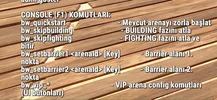
14. Set Barriers (F1 Console)
bw_setbarrier1 1 Main
bw_setbarrier2 1 Main
15. Save
/bw_save
WARNİNG!!
Please watch the installation video and don’t forget to give your players a fast bed in the starting kit. Bed crafting is disabled in the arenas, so admins must include a fast bed in the starting kit during setup.
SETUP VİDEO : (please watch )
What is Bedwars?
Competition has always existed in Rust.
But true competition is more than just survival.
BedwarsPro was created to bring a completely new experience to Rust servers.
This is not a simple mini-game.
It is a fully-featured BedWars system where strategy, teamwork and speed collide.
Players enter the arena.
Teams are formed.
The timer starts.
The first phase is BUILDING.
Resources are gathered.
Bases are built.
Defenses are prepared.
Every team knows one thing:
As long as their bed stands, they stay in the game.
But that safety is temporary.
When the timer ends, the FIGHTING PHASE begins.
PvP is enabled.
A SupplyDrop falls from the sky.
And now there is only one goal:
Destroy the enemy beds.
Once a bed is destroyed, everything changes for that team.
There are no second chances.
No more respawns.
Every fight, every move, every decision becomes critical.
BedwarsPro delivers this tension perfectly into Rust.
With its advanced UI system, players can:
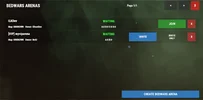
Track arena status in real time
Monitor team information
Clearly see phases and timers
For VIP players, a completely different experience awaits.
Private VIP arenas, invite systems, exclusive kits and full customization…
Admins stay in full control.
Unlimited arenas.
Detailed configuration.
Quick starts, phase skipping, live management.
Resource generators.
NPC vending shops.
SupplyDrop loot tables.
Spectator mode.
Persistent player statistics.
And most importantly:
All of this is built with performance, stability, and long-term use in mind.
BedwarsPro is a comprehensive BedWars mini-game system developed for Rust servers. It combines classic BedWars mechanics with Rust gameplay, offering team battles, bed protection, respawn systems, build phase, fighting phase, VIP arena system, vending profiles, resource generators, supply drops, quarry integration, team clothing, and detailed arena management — all in a single plugin.
If you want to create an event-based, competitive, and highly replayable game mode on your server, BedwarsPro provides a powerful ready-to-use infrastructure.
Key Features
- Advanced multi-arena BedWars system
- 2 to 8 teams support
- Bed-based respawn system
- Starting / Building / Fighting / Finished phases
- Player systems: join / leave / accept invite
- VIP private arena system with invite functionality
- NPC vending spots with profile save/apply system
- Resource spots and resource generators
- Supply Drop and beacon calling system
- Mining Quarry integration (scrap generation during BUILDING phase)
- Team-based colored hoodie/pants skins
Arena-based:
start kit
respawn kit
team select kit
- Arena-based custom build settings
- Arena-based custom hit count / gather multipliers
- Blueprint unlock system
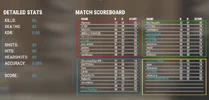
- Player statistics: kill, death, score, headshot
- Automatic match ending and winner detection
- Multi-language support (Turkish, English, Russian)
- Gameplay Logic
In BedwarsPro, players are divided into teams, defend their base, and try to destroy enemy beds. If a player’s team still has their bed, they can respawn after death with a delay. However, if the team’s bed is destroyed, the player will be permanently eliminated after death. The plugin also includes a spectator system for eliminated players.
Match phases:
WAITING – players wait
STARTING – countdown begins
BUILDING – players prepare and build
FIGHTING – full combat begins
FINISHED – arena ends
Dependencies
The plugin references the following:
Kits plugin
CustomVendingSetup plugin
If you want to use kit systems, the Kits plugin is required. Otherwise, start kit, respawn kit, and VIP kit features will not function. The plugin also includes warning messages for missing dependencies.
Advanced Systems
1) VIP Arena System
VIP players can create private arenas, invite players, and customize arena name and owner. Invite cooldown and max invites can be configured.
2) Team Clothing System
Each team has unique hoodie and pants skins (Red, Blue, Green, Yellow, Purple, Orange, Pink, Cyan), making teams easily distinguishable.
3) Resource Spot System
Custom resource nodes:
hemp
stone
metal
sulfur
fuelred
palm
4) Resource Generator System
Generators produce items at specific intervals.
5) Vending Profile System
Save and reuse vending setups across arenas.
6) Supply Drop System
Players can call supply drops with configurable cooldowns and loot tables.
7) Quarry System
Linked quarries generate scrap during BUILDING phase.
8) Build Settings
Customizable:
blueprint ignore
stack multiplier
craft speed
furnace speed
gather multiplier
blueprint unlock
quarry scrap rate
9) Hit Count System
Adjust damage multipliers for trees and ore nodes.
10) Ore Conversion System
Includes automatic conversions:
metal ore → fragments
sulfur ore → gunpowder
HQM conversion system
Arena Setup Guide
1. Give Permissions
bedwarspro.admin
bedwarspro.use
bedwarspro.vip
2. Set Global Points
/bw_setlobby
/bw_setarenalist
3. Create Arena
/bw_create 1 Arena1
4. Add Team Spawns
/bw_addspawn A
/bw_addspawn B
/bw_addspawn C
/bw_addspawn D
5. Set Team Count
/bw_setteamcount 1 4
6. Set Minimum Players
/bw_setminplayers 1 4
7. Set Kits
/bw_setstartkit 1 starterkit
/bw_setteamselectkit 1 teamkit
/bw_setrespawnkit 1 respawnkit
8. Set Bed Respawn Time
/bw_setbedtime 30
9. Add Team Select Points
/bw_addteamselect
10. Add Resources & Generators
/bw_addres stone 20
/bw_addgen scrap 10 5
11. Add Vending
/bw_addvending
/bw_vprof_save market1
/bw_vprof_apply market1
12. Setup Supply Drop
/bw_setsupplydrop 1
/bw_setsupplycall 1
/bw_spawnsupplydrop 1
13. Add Quarry
/bw_addquarry 1
14. Set Barriers (F1 Console)
bw_setbarrier1 1 Main
bw_setbarrier2 1 Main
15. Save
/bw_save
WARNİNG!!
Please watch the installation video and don’t forget to give your players a fast bed in the starting kit. Bed crafting is disabled in the arenas, so admins must include a fast bed in the starting kit during setup.
SETUP VİDEO : (please watch )
What is Bedwars?
Competition has always existed in Rust.
But true competition is more than just survival.
BedwarsPro was created to bring a completely new experience to Rust servers.
This is not a simple mini-game.
It is a fully-featured BedWars system where strategy, teamwork and speed collide.
Players enter the arena.
Teams are formed.
The timer starts.
The first phase is BUILDING.
Resources are gathered.
Bases are built.
Defenses are prepared.
Every team knows one thing:
As long as their bed stands, they stay in the game.
But that safety is temporary.
When the timer ends, the FIGHTING PHASE begins.
PvP is enabled.
A SupplyDrop falls from the sky.
And now there is only one goal:
Destroy the enemy beds.
Once a bed is destroyed, everything changes for that team.
There are no second chances.
No more respawns.
Every fight, every move, every decision becomes critical.
BedwarsPro delivers this tension perfectly into Rust.
With its advanced UI system, players can:
Track arena status in real time
Monitor team information
Clearly see phases and timers
For VIP players, a completely different experience awaits.
Private VIP arenas, invite systems, exclusive kits and full customization…
Admins stay in full control.
Unlimited arenas.
Detailed configuration.
Quick starts, phase skipping, live management.
Resource generators.
NPC vending shops.
SupplyDrop loot tables.
Spectator mode.
Persistent player statistics.
And most importantly:
All of this is built with performance, stability, and long-term use in mind.
-
 bed2.webp
 -
 bed3.webp
 -
 bed4.webp
 -
 bed5.webp
 -
 bed6.webp
 -
 bed7.webp
 -
 bed8.webp
 -
 bed9.webp
 -
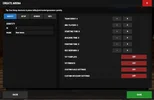 bed10.webp
 -
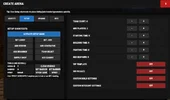 bed11.webp
 -
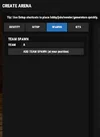 bed12.webp
 -
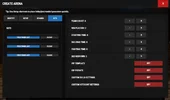 bed13.webp
 -
 bed14.webp
 -
 bed15.webp
 -
 bed16.webp
 -
 bed22.webp
 -
 bed33.webp
 -
 bed44.webp
 -
 b7.webp
 -
 b6.webp
 -
 b3.webp
 -
 2.webp
 -
 sonuç ui.webp
 -
 b2.webp

