- Языки
- Русский
- Английский
- Другой
- Дополнительный плагин
-
Creative Area Selector (CAS)
Let players claim exactly one creative plot via a sleek, paginated UI—auto-teleport included. Admins place spots in-game, CAS handles the rest: map markers, VIP-only plots, guest invites, optional grants/loadouts, raid mode teleport, and automatic cleanup when unclaimed. Multi-language out of the box.
CreativeAreaSelector
Why Server Owners Love CAS
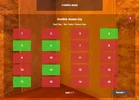
- One-click claiming with pages: Players open a CUI panel (20 tiles per page) and pick their plot; CAS teleports them instantly. Tiles show Free/Your/Taken/VIP with colors and labels.
- In-world, admin-friendly setup: Create, rename, remove, or VIP-gate spots from inside the game—no map editors needed.
- Live map markers: CAS drops a radius marker + vending marker at each owner’s plot, with a customizable “owner + grid” name.
- Guest invites: Owners can invite other players; guests are teleported, granted optional loadouts/permissions, and can be auto-cleaned when they leave.
- Raid mode (optional): Teleport to any plot in raid mode if you hold a dedicated permission—perfect for events/tests.
- Auto-open zone: Define a radius where the selection UI pops up automatically when players arrive (with re-enter cooldown).
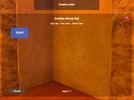
- Info panel: Show a configurable info window on claim (title, lines, colors, auto-close).
- Grants & loadouts: On claim/invite/raid, CAS can auto-grant groups/permissions and deliver a full configurable kit; revoke and clear on unclaim.
- Command safety: Block selected commands inside creative areas (e.g., /kit, /tpr) and add global teleport cooldowns.
- Zero-leftovers: On unclaim (owner, guest, raid leave, admin, audit), CAS can wipe structures/entities in radius, clear inventory, revoke grants, and move players to a safe fallback.
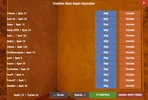
- Admin dashboard: Paginated admin UI lists all owners with quick Info / Unclaim / TP and TC Audit controls.
- Automatic TC Audit: Scheduled scan unclaims areas with no TC (optionally skipping online users).
- Localization built-in: English, Turkish, and Russian message packs included.
Player Experience
- Open UI: /crarea (alias buttons inside the UI) → pick a plot → instant teleport. If you already own a plot, CAS prevents double-claim.
- Invite friends: From your claimed plot, open the Invite UI and one-tap invite online players. Accepting teleports the guest and applies optional loadouts/grants.
- Leave / Unclaim: /crarea unclaim returns you to the server-defined fallback and (optionally) cleans your area. Guests can leave too.
Key Configuration Highlights
All settings live in the plugin’s config (auto-generated on first run).
- Core
- OpenCommand (default: "crarea")
- CooldownSeconds — teleport cooldown for claims.
- CloseUIAfterTeleport — keep or close the menu.
- Auto-Open UI Zone
- AutoOpenEnabled, AutoOpenX/Y/Z, AutoOpenRadius, AutoOpenReenterDelay.
- Map Markers
- MarkerNameFormat (supports {0} {1} → player + grid), MarkerRadius, MarkerAlpha, DefaultMarkerColor.
- Access & Safety
- VipPermission, RaidPermission, BlockedCommands (list), GrantGroups, GrantPermissions, RevokeGrantsOnUnclaim.
- Automation
- AutoRunOnClaim + AutoRunCommandOnClaim (supports multiple commands separated by ; or new lines).
- Kits & Inventory
- GiveLoadoutOnClaim + ClaimLoadout (Wear/Belt/Main item lists with short names/skins).
- ClearInventoryOnUnclaim.
- Cleanup
- WipePlayerStructuresOnUnclaim, WipeRadiusMultiplier, UnclaimTeleportX/Y/Z.
- TC Audit
- TCAuditEnabled, TCAuditIntervalMinutes, TCAuditExcludeOnline.
- Info UI
- InfoUI.Enabled, ShowOnClaim, Title, Lines, AutoCloseSeconds, PanelColor, TextColor.
CAS stores players, spots, markers, and quick stats in data files under
FAQ
Q: Can players own more than one creative area?
A: No—CAS enforces one active claim per player.
Q: What happens on unclaim or raid-leave?
A: CAS can teleport to a safe fallback, wipe owned structures/entities within the configured radius, clear inventory, and revoke grants—fully automatic.
Q: How are VIP spots handled?
A: Per-spot permissions: set to vip, none/everyone, or any custom permission string. Tiles show VIP and are color-coded.
Q: Does CAS block commands inside creative plots?
A: Yes—add any command to BlockedCommands (e.g., kit, tpr, menu, horse). Players are warned if they try to use them.
Q: Which languages are bundled?
A: English, Turkish, and Russian message packs are included (you can extend via lang)